Unicode, at profile size
Social Bio Font Preview
You can't install a font in a bio — no network offers one, and font files don't run inside text fields. The only approach that works is swapping your letters for decorative Unicode characters. But that raises a question most tools skip: not which style looks best, but which one survives the character limit, the phone, and the app. This page gives you five platform previews, 18 styles to compare, and a counter checked against each network's limit.
- 5 platform layouts
- 18 Unicode styles
- Code-point counts
- Nothing uploaded
02 The bio preview
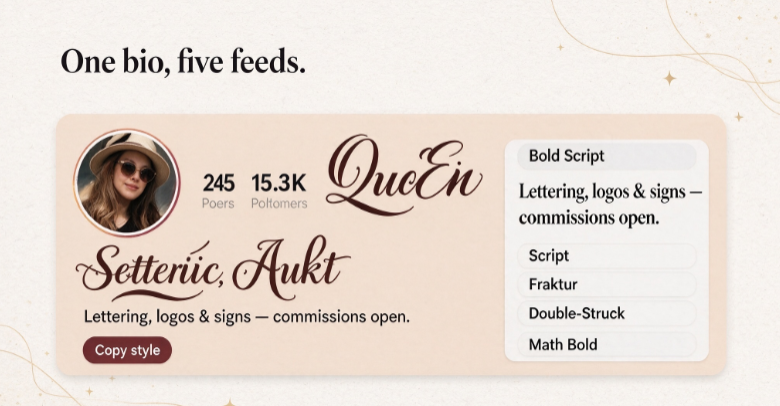
One bio, five feeds.
Unicode · 18 styles · no upload
𝓛𝓮𝓽𝓽𝓮𝓻𝓲𝓷𝓰, 𝓵𝓸𝓰𝓸𝓼 & 𝓼𝓲𝓰𝓷𝓼 — 𝓬𝓸𝓶𝓶𝓲𝓼𝓼𝓲𝓸𝓷𝓼 𝓸𝓹𝓮𝓷.
mayaellis.example𝓛𝓮𝓽𝓽𝓮𝓻𝓲𝓷𝓰, 𝓵𝓸𝓰𝓸𝓼 & 𝓼𝓲𝓰𝓷𝓼 — 𝓬𝓸𝓶𝓶𝓲𝓼𝓼𝓲𝓸𝓷𝓼 𝓸𝓹𝓮𝓷.
mayaellis.example𝓛𝓮𝓽𝓽𝓮𝓻𝓲𝓷𝓰, 𝓵𝓸𝓰𝓸𝓼 & 𝓼𝓲𝓰𝓷𝓼 — 𝓬𝓸𝓶𝓶𝓲𝓼𝓼𝓲𝓸𝓷𝓼 𝓸𝓹𝓮𝓷.
𝓛𝓮𝓽𝓽𝓮𝓻𝓲𝓷𝓰, 𝓵𝓸𝓰𝓸𝓼 & 𝓼𝓲𝓰𝓷𝓼 — 𝓬𝓸𝓶𝓶𝓲𝓼𝓼𝓲𝓸𝓷𝓼 𝓸𝓹𝓮𝓷.
𝓛𝓮𝓽𝓽𝓮𝓻𝓲𝓷𝓰, 𝓵𝓸𝓰𝓸𝓼 & 𝓼𝓲𝓰𝓷𝓼 — 𝓬𝓸𝓶𝓶𝓲𝓼𝓼𝓲𝓸𝓷𝓼 𝓸𝓹𝓮𝓷.
Layout approximations drawn for this page, not official previews. Sample profile, links and counts are placeholders; no affiliation with any network.
18 Unicode styles
Pick a style and the preview, counts and meter update together.
What the five cards are — and are not
The five panels you see are not screenshots. They are live previews built in your browser. The profile frame — avatar, follower count, buttons — is a stand-in with fake numbers, but the bio text is real. It uses the same fancy letters you would actually paste, shown with the same fonts your phone has. So if something looks broken here, it will be broken when you paste it for real.
We kept the sample bio simple on purpose — just a studio name, a link, and a call to action. You are not here to admire a slogan. You are here to see how a real sentence fits into a tight space. The profile name, handle and follower count stay the same no matter what you type. Only the bio and the style change.
Five fields, five ceilings
Not every platform gives you the same amount of room. Some put the number in their help docs. Others just cut you off without telling you where the line is. Here is what we found:
| Platform | Field | Limit | Status | What counts |
|---|---|---|---|---|
| Bio | 150 | Enforced by the field, not published | Characters in your text | |
| TikTok | Bio | 80 | Enforced by the field, not published | Characters in your text |
| Discord | About Me | 190 | Published in documentation | Characters including emojis, formatting and links |
| X / Twitter | Profile bio | 160 | Enforced by the field, not published | Some letters count as more than one character |
| YouTube | Channel description | 1,000 | Published in documentation | Characters in your text |
| Discord and YouTube publish their limits officially. The Instagram, TikTok and X numbers are what their editors actually enforce as of November 2026 — they are not published and could change. Check again before you rely on one. | ||||
YouTube is the odd one out. Your channel description does not sit under your name — it lives on a separate About page. We show it that way because YouTube gives you the most room by far, and that is where you might actually try a longer styled paragraph.
Why the counter can be trusted
You might notice the counter here sometimes disagrees with other tools you have tried. That is because fancy letters are tricky to count — one decorative character can take up two slots behind the scenes, even though it looks like one. We count what you see, not what the computer stores. That matches how the platforms check your bio, so the number here should match the number the app gives you.
A few things to watch out for. Emoji often count as more than one character even though they look like one. Discord includes your formatting and links in its 190-character count. X is the trickiest — it makes some letters count as more than one, so even if the counter says you are fine, X might disagree. When that happens, trust the app. This tool is here to catch big mistakes, not to argue with the platform.
Three safe styles, fifteen that depend on the device
Every style card has a dot that tells you how well that style is supported across devices. Three styles — Fullwidth, Circled and Small Caps — use characters that every phone and browser has supported for years. They are the safe bet. They work on old Android, in-app browsers, even game apps. But none of them looks cursive, which is probably why you are here.
Six styles are a mixed bag. Some of their letters are widely supported and some are not, so you might get a word that half shows up and half turns into boxes. The remaining nine styles only work on newer devices. This is where the cursive-looking styles live — Script, Bold Script and Fraktur. They look beautiful on a new iPhone or Chrome, but on an older Android or inside an in-app browser they fall apart. The copy-paste reference spells out which characters each style uses, if you want the details.
A paste workflow that survives a phone check
- Start with plain text. Write your bio in normal letters first and get it under the smallest limit you care about. If you are posting to TikTok, that means 80 characters, not 150.
- Save the style for last. Fancy letters do not make a long bio shorter. Get your words right, then dress them up.
- Check all five counters. The tabs update together, so you can see your TikTok count while looking at the Instagram preview.
- Paste into the real app. If the app's counter disagrees with ours, the app wins.
- Check it on your phone. Look for boxes, cut-off text, or a call to action that has fallen off screen. Do this on mobile data, not just on Wi-Fi.
- Keep a plain version saved. Your name, handle and links cannot be styled, and plain text is what search and screen readers can actually read.
When the bio should be an image instead
Sometimes fancy letters are not the answer. If your bio needs to show up in search, be read aloud by a screen reader, or be copied by someone else, decorative characters will work against you. A styled handle will not let you sign up. A styled caption will not show up in search results. A screen reader will read 𝓜𝓪𝔂𝓪 as a string of symbols instead of a name. For those situations, use the font generator instead. It creates a real font image — a PNG or SVG you paste as a picture.
Images have their own trade-offs. A profile picture is not a bio. An image in your bio cannot be a clickable link on most platforms. And search engines cannot read text inside an image. The simple rule: keep it plain if it needs to be found or copied. Make it an image if it just needs to look good. Use fancy letters in your bio only when looking good matters more than being found. The name generator makes the same call for the name field.
Questions people ask
Will my profile look exactly like this preview?
No. No tool can promise that. The profile frame here is a rough preview, and the bio text will look different on each platform because they all use their own fonts and their own line breaks. What this preview does show you is what you cannot tell from a text box: how long your styled bio really is, how it looks next to a follower count, and whether any letters will turn into empty boxes on your phone. Use it as a reality check, not a promise.
Why is there no font menu on any of these networks?
Because your bio is a plain text field, and none of these apps lets you choose a font for it. The only way to change how it looks is to swap your normal letters for fancy decorative ones — which is what the 18 styles below do. That trick has downsides: your bio will not match normal searches, screen readers will stumble over it, and older phones may show boxes instead of letters. The copy-paste tool explains those downsides for each style. This page shows you what they look like in a real profile.
Why do the name and handle stay in plain letters?
Because most platforms only allow regular letters, numbers, underscores and periods in those fields. Fancy letters get rejected. A styled display name sometimes slips through, but a styled handle will fail when you try to sign up or will get stripped out of your profile link. That is why we locked the sample profile. The bio is the only field where styling actually works. If you want your name to look styled, the name generator can turn it into an image.
Which styles are safest for a bio?
Fullwidth, Circled and Small Caps work on almost every device, but they do not look cursive at all. Six styles are a mixed bag — part of a word might show up while the rest turns into boxes. Nine styles only work on newer phones and browsers, and that is where the cursive-looking ones live. Older Android and in-app browsers are where they break. Check the dot on each card, then check your own phone before you commit.
Does the tool store or upload the bio I type?
No. Everything happens in your browser. There is no account, no server, and nothing leaves your device. Your styled text goes to your clipboard and nowhere else. Reload the page and you are back to the sample bio — nothing is saved.
Keep Reading
Cursive Copy and Paste
The 18 alphabets behind this preview, with the Unicode block and plane cost of every style.
Cursive Font Generator
When the text has to be an image: 28 real typefaces exported as transparent PNG or SVG.
Cursive Name Generator
For the name field the bio preview cannot style — a name rendered as an image, not a string.